About
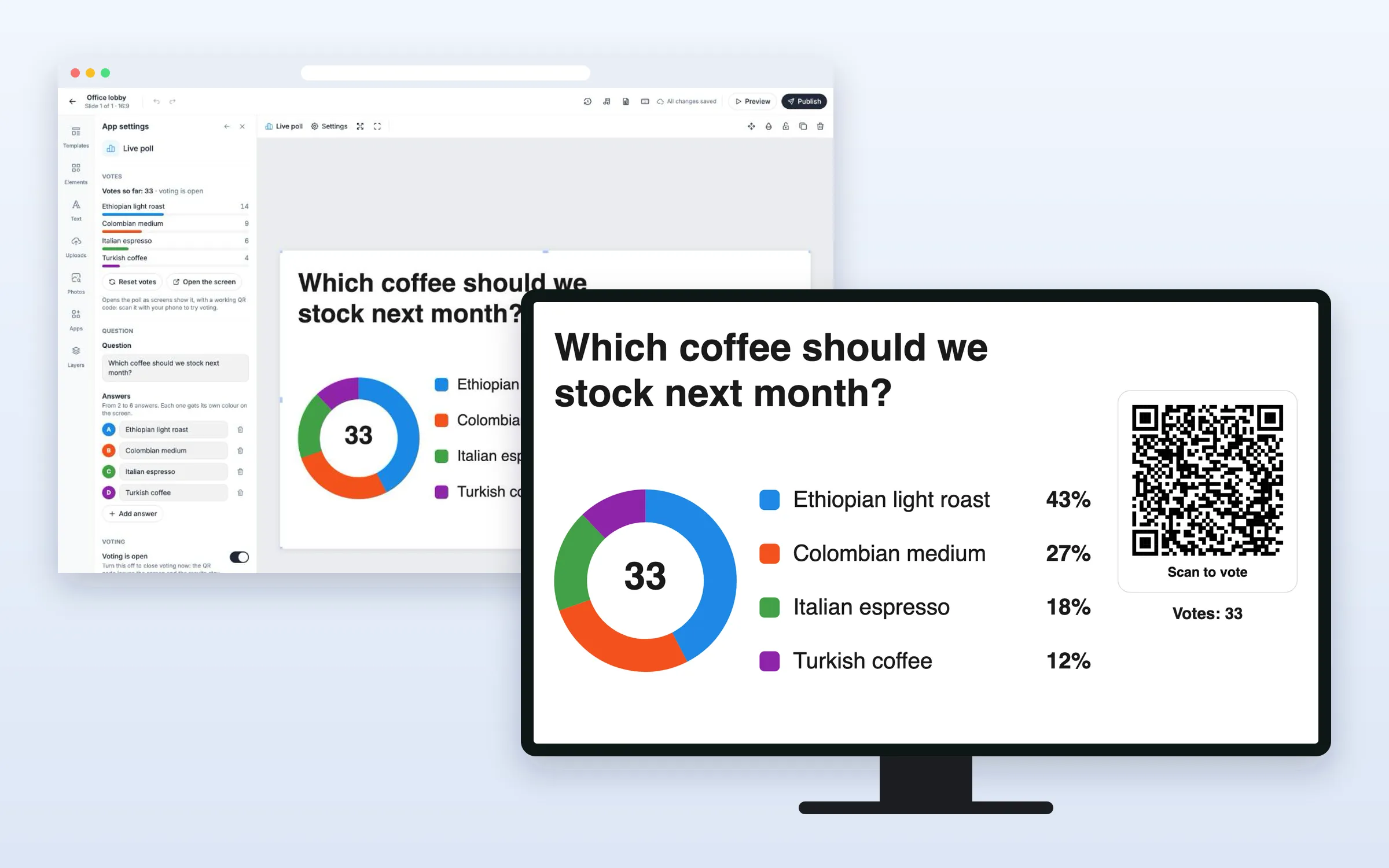
Put a question on your screens and let people answer it. Viewers scan the QR code and vote on their phone, with no app and no sign-in, and the results show on the screen as bars, columns or a donut within about a second. Show the results live, or only once voting has closed. On every plan.
Get Started
Everything here starts in the editor: open your playlist and the slide. When you’re done, click Publish.
Set up the poll
Add a live poll to a slide
- Click Apps, and click Live poll under More apps (or type “poll” in Search apps)
- In the Question tab, type the Question and fill in Answer A and Answer B. Click Add answer for more
- In the Voting and Look tabs, choose when voting closes and how it looks. The Preview shows the screen while voting and when closed
- Click Create poll
The poll fills the slide. After that, every setting is in App settings on the right, and changes save by themselves.
Close voting
- In App settings, turn off Voting is open. The QR code leaves the screen and the results stay
- Or turn on Close voting at a set time and choose the Closing time. Voting closes by itself, and the screen shows when
Show the results only at the end
- Set Show the results to Only once voting has closed
Until then, the screen shows the answers with their letters, and voters’ phones say the results appear on the screen when voting closes.
Start again with no votes
- In App settings, under Votes, click Reset votes and confirm
All votes are deleted and everyone can vote again. This can’t be undone.
Try it yourself
- In App settings, under Votes, click Open the screen
The poll opens as screens show it, with a QR code that works, so you can vote from your own phone.
For your viewers
How viewers vote
- They scan the QR code on the screen with their phone camera
- They tap the button of their answer
They see “Thanks for voting!” and their vote, and can tap Change my vote while voting is open. Each phone has one vote.
Options
Click the poll on the slide to change these in App settings.
Question
| Option | What it does |
|---|---|
| Question | Up to 140 characters |
| Answers | 2 to 6 answers, up to 60 characters each, each with its own color |
Voting
| Option | What it does |
|---|---|
| Voting is open | Turn it off to close voting now. The QR code leaves the screen and the results stay |
| Close voting at a set time | Voting closes by itself at the Closing time you choose |
| Show the results | Live, while people vote, or Only once voting has closed |
Look
| Option | What it does |
|---|---|
| Results as | Bars, Columns or Donut |
| Colour theme | Classic, Night, Calm, Bold or Mono |
| Background, Text, Answer colours | Your own colors |
| Font | Standard font, or one of the editor’s built-in fonts |
| Text under the QR code | Up to 60 characters. Empty shows “Scan to vote” |
| Language | The language of the screen and of the voters’ phones, from 13 languages |
Votes
| Option | What it does |
|---|---|
| Votes so far | The number of votes and a bar per answer |
| Reset votes | Deletes all votes, so everyone can vote again |
| Open the screen | Opens the poll as screens show it |
FAQ
Which plans include the Live Poll?
Every plan.
How do you make sure each person votes once?
Each phone gets one vote, which it can change while voting is open. It’s remembered in the phone’s browser, so someone who clears it or uses another browser can vote again. That’s fine for a fun or informal poll, not for an official vote.
Can people vote from a photo of the QR code?
Not for long. The QR code changes every 15 minutes, and an old one stops working within 30 minutes, so a photo or a forwarded link soon stops working.
How many votes can a poll take?
Up to 50,000 phones per poll.
What if the screen loses its internet connection?
The poll needs internet. If the connection drops, the screen keeps the last results, shows a small red dot and reconnects by itself.
Do my screens need an update?
No. Screens show the poll like other web apps, on the players you already have.