About
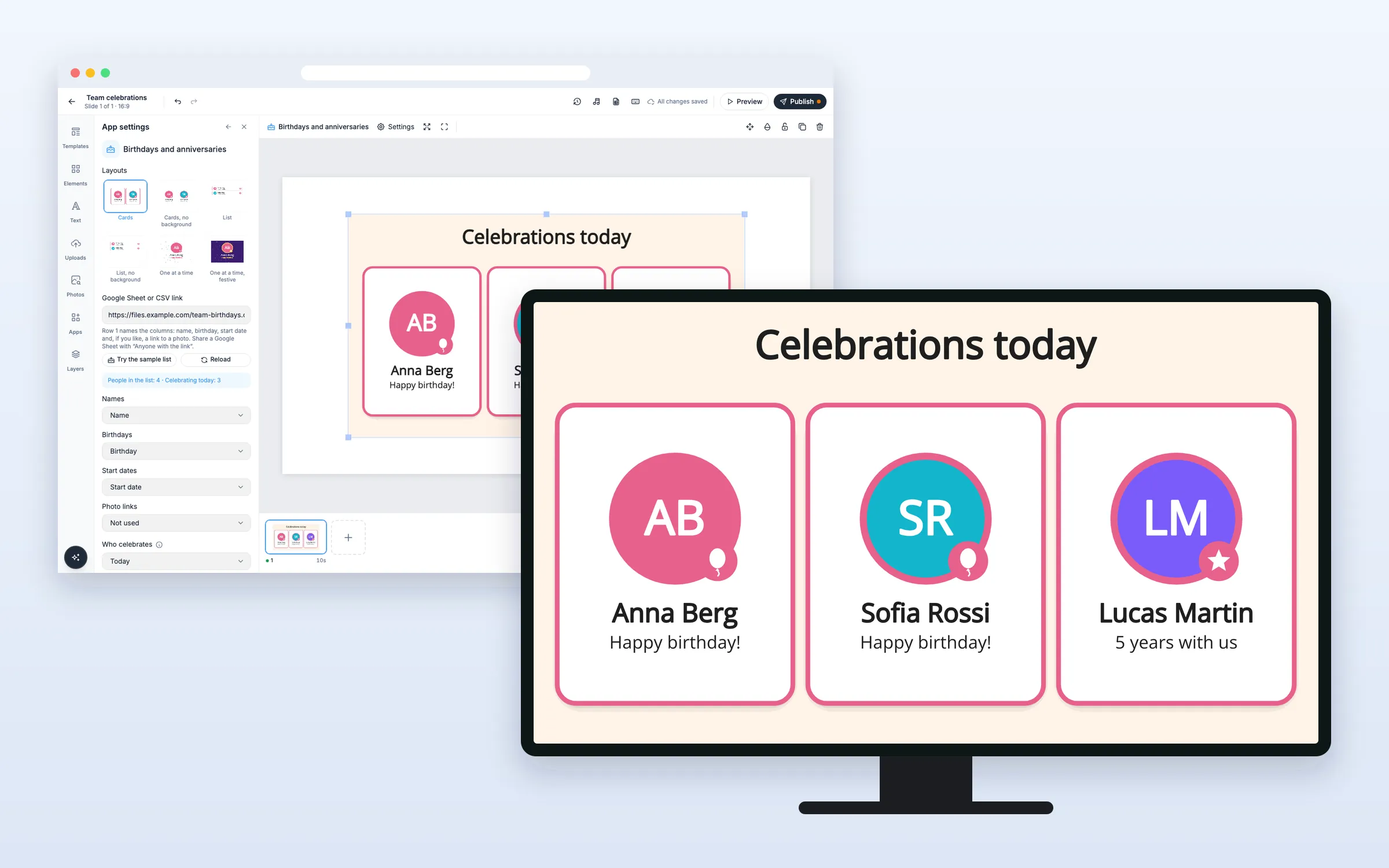
Celebrate your people on screen. Keep names, birthdays and start dates in a Google Sheet or CSV file, and the screen shows who has a birthday or work anniversary today, this week or this month, with photos if you add them. It switches to the new day at midnight by itself. On every plan.
Get Started
Everything here starts in the editor: open your playlist and the slide. The editor saves by itself. When you’re done, click Publish.
Set up the list
Add birthdays and anniversaries to a slide
- Click Apps, and click Birthdays and anniversaries under More apps (or type “birth” in Search apps)
- It’s added with sample people, and the settings open
- Paste your link into Google Sheet or CSV link, or click Try the sample list to see it with made-up people
- Pick a Layout and Who celebrates: Today, This week (Monday to Sunday) or This month
The panel shows how many people are in the list and how many celebrate today. You can publish once a list is linked.
Prepare your sheet
- Put the column names in row 1: a name, a birthday, a start date and, if you like, a photo link (a web address of a picture)
- In Google Sheets, set sharing to “Anyone with the link” and paste its normal link. A sheet published to the web as CSV, or any public CSV file, works too
Columns are recognized by their names in many languages. If one isn’t, pick it under Names, Birthdays, Start dates and Photo links, or choose Not used. Dates can be written in most common ways, like 1990-11-24, 24.11.1990, 11/24/90, 24 November 1990 or Nov 24.
Update the list
Change your sheet, and screens pick it up within an hour. To see it in the editor at once, click Reload.
Change what it shows
Show only birthdays or only anniversaries
- Set Celebrate to Birthdays only or Work anniversaries only
Show the age and your company name
- Turn on Show age to show “Happy birthday! · 34 years”. The birth year itself is never shown
- Type your Company name to show “5 years at Company”. Empty shows “5 years with us”
Choose what shows when nobody celebrates
- Set When nobody celebrates to Show a message (a balloon and “No celebrations today”) or Show nothing
- Type your own Message when nobody celebrates if you like
The slide still plays when there’s nothing to show.
Options
Click it on the slide to change these in App settings.
| Option | What it does |
|---|---|
| Layouts | Cards, Cards no background, List, List no background, One at a time or One at a time festive |
| Google Sheet or CSV link | Your list of people |
| Names, Birthdays, Start dates, Photo links | Which column holds what |
| Who celebrates | Today, This week or This month |
| Celebrate | Birthdays and work anniversaries, Birthdays only or Work anniversaries only |
| Show photos | On to start with |
| Show age | Off to start with |
| Company name | Used in “5 years at Company” |
| When nobody celebrates | Show a message or Show nothing |
| Message when nobody celebrates | Your own text. Empty shows “No celebrations today” (or this week, this month) |
| Show the title, Your own title | The heading. Empty shows “Celebrations today” (or this week, this month) |
| Seconds per page | 4 to 60, 8 to start with. Pages turn when more people celebrate than fit |
| Dates like 03/04 are | Automatic, 3 April (day first) or March 4 (month first) |
| Style | Light, Dark, Festive, Pastel or Custom |
| Font | Open Sans to start with |
| Colors | Text colour, Highlight colour, Card colour, Background colour, and how see-through the cards and background are |
| Language | Same as the screen, or one of 12 languages |
FAQ
Which plans include Birthdays and Anniversaries?
Every plan.
Can I leave out the birth year?
Yes. Write the birthday without a year, like 24/11. Then no age is shown. A work anniversary needs the start year.
What about birthdays on 29 February?
They show on 28 February in other years.
How long can the list be?
Up to 5,000 rows and 100 columns, in a file of up to 5 MB.
What if the screen goes offline?
It keeps showing the last list for up to 7 days, also after a restart, and still switches to the new day at midnight.
Do my screens need an update?
No. Screens show it like other web apps, on the players you already have.