
About
Player devices used in digital signage are usually significantly less powerful than an average laptop. For smooth playback, signage content should therefore be optimized for these devices. If your video stutters or doesn’t play at all, it could be because the player hardware does not support the codec (encoding) format of the video. The solution is to re-encode the video in a common format that is easy to decode.
The most popular format is H.264, and a newer one is H.265 (HEVC). It may seem tempting to use the newer and more compact H.265 format, but it can actually cause problems: because it is more compressed, the player has to do more work to decode it. H.264 video takes more space, but needs less computing power to play. On a modern laptop, this usually isn’t an issue, but on $20–100 devices powered by a USB cable, it can make a big difference.
HandBrake is a free, open-source video transcoder that allows you to convert video files from nearly any format to modern, widely supported codecs. Optimizing your videos with HandBrake helps your digital signage screens play them smoothly and in high quality.
Get Started
If you have issues with a video, it’s usually because the video resolution or bit rate isn’t optimized for your media player. Android, Amazon, Windows, etc. all handle video playback in their own way.
Download HandBrake at handbrake.fr.
Open HandBrake, find your video, choose the preset Fast 1080p30, toggle on Web Optimized and click Start. After a few minutes, you’re ready to upload your video to your library.
Encoding 4K portrait video
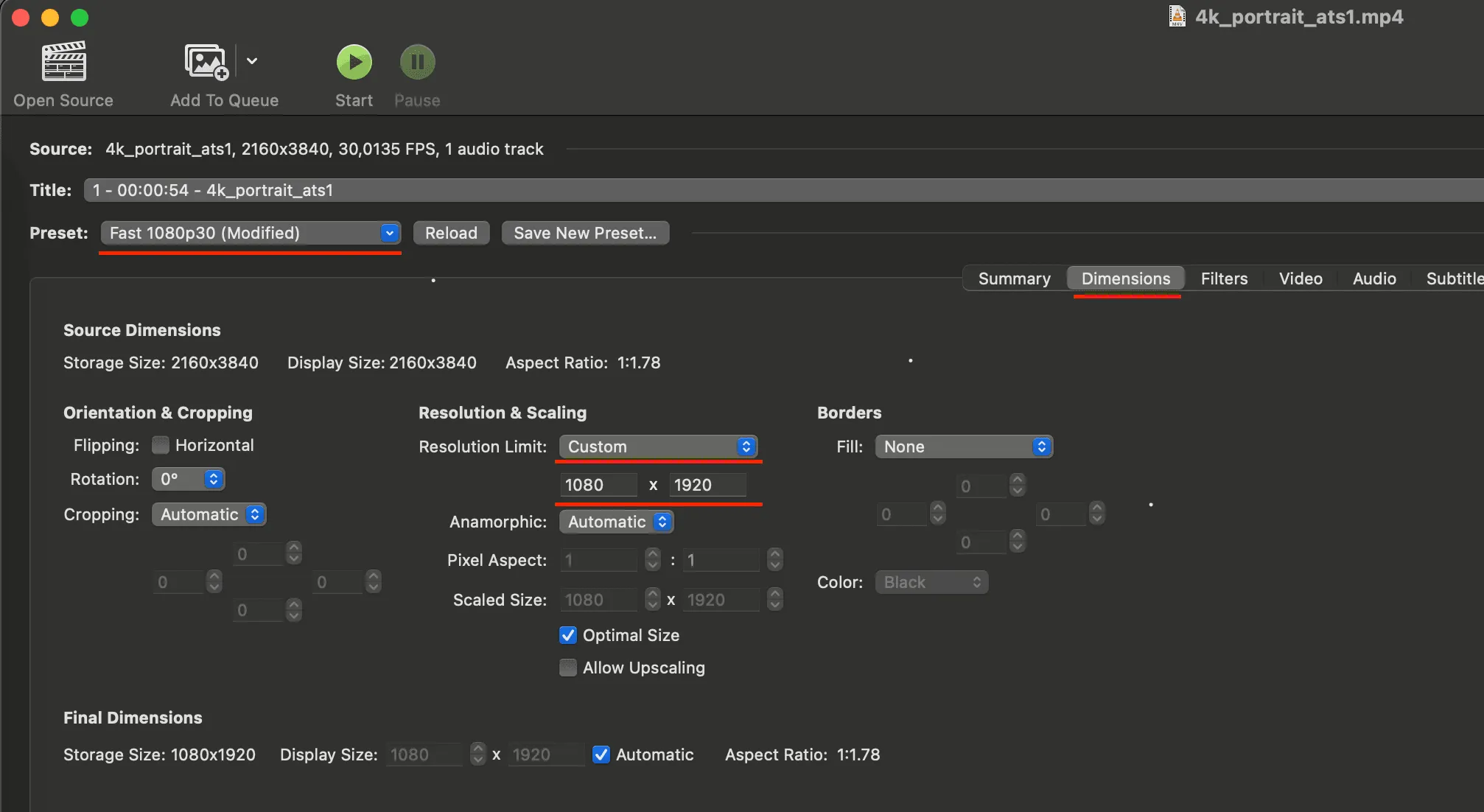
If you re-encode 4K portrait video (2160 x 3840) to Full HD (1080 x 1920), there is an extra step in HandBrake.
- Select your video.
- Select the “Fast 1080p30” preset.
- Select the “Dimensions” tab.
- Under “Resolution & Scaling”, set “Resolution limit” to “Custom”.
- Fill in the value 1080 x 1920.
- Click “Start”.
FAQ
Can I run 4K content?
Our software supports 4K, but your media player may not. Many entry-level media players don’t play back in 4K, even when they are advertised as 4K. For example, Google Chromecast and several Fire TV Sticks are advertised as 4K, but third-party apps only run in HD on them.
It says the bit rate is too high.
Entry-level devices have limited resources, and there is more to it than just the resolution. A video’s bit rate defines how much data it uses per second. We recommend a bit rate of no more than 8,000 kbit/s, which is about 1 megabyte per second of video. So a 60-second clip should not exceed about 60 megabytes. This is quite reasonable for Full HD, but the exact limits depend on your player hardware.
Is HandBrake Free?
Yes. HandBrake is open source, built by volunteers, and free.
Can I use my MacBook?
Yes. HandBrake is available for macOS, Windows and Linux.