


Play Digital Signage Feature: Screenfeed x HTML5 Plugin
Blogpost was published on June 15, 2024
Digital signage content feeds like those from Screenfeed and the HTML5 website plugin from Play Digital Signage work together to give you effortless, beautiful digital signage. Today, we will explore what Screenfeed is, what an HTML5 Website Plugin is, how they work together, and how to integrate them together with Play Digital Signage. Plus at the end, we will talk about some digital signage content ideas, too!
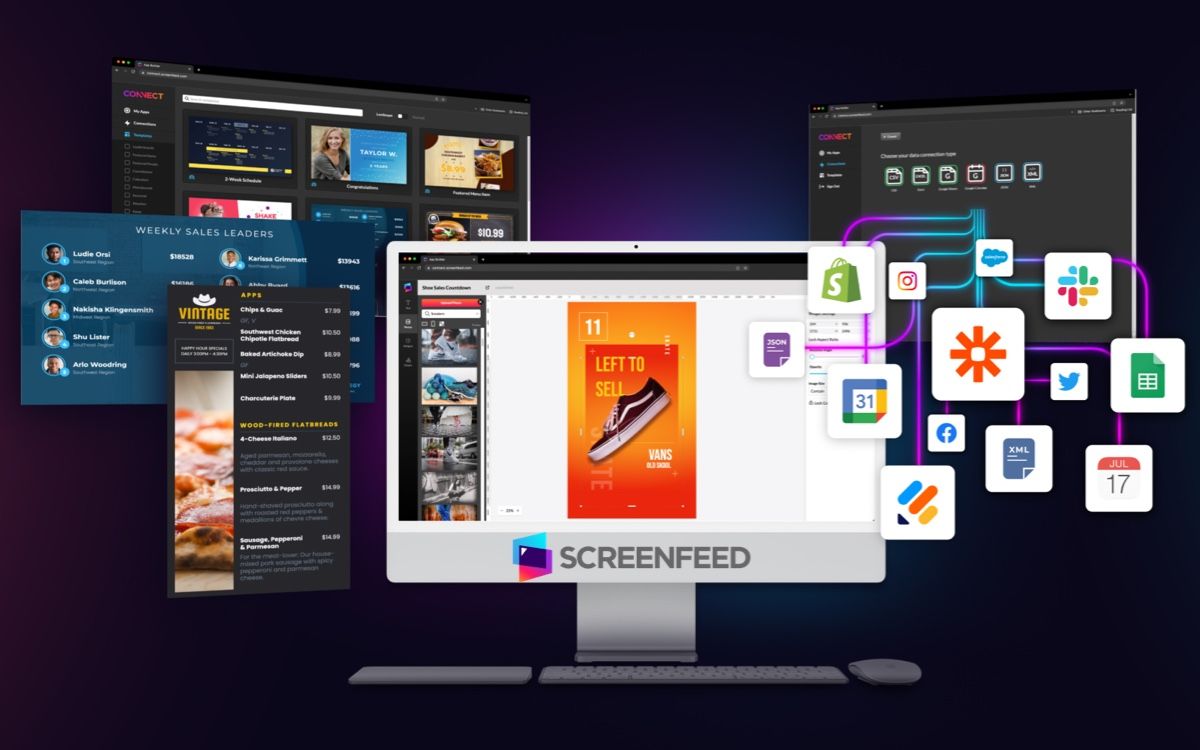
What is Screenfeed?
Screenfeed is a leading provider of content services specifically designed for digital signage. Offering a diverse range of content, Screenfeed delivers news, weather, traffic, sports, and custom HTML5 content that can be easily integrated into any digital signage system. Their mission is to enhance digital signage displays by providing fresh, engaging, and up-to-date content that captivates audiences. Screenfeed’s solutions are trusted by numerous industries, including retail, healthcare, education, and corporate environments, for their reliability and high-quality content offerings.
What is an HTML5 Website Plugin?
An HTML5 website plugin is a tool that allows the integration of live HTML5 websites into another platform or application, such as digital signage software. Unlike static content, HTML5 websites are dynamic and can display real-time information, interactive elements, and continuously updating content. This plugin essentially acts as a bridge, enabling digital signage displays to show content directly from a live website, in this case, a curated feed from Screenfeed, thus keeping the displayed information current and interactive.
How Screenfeed and an HTML5 Website Plugin Work Together
Screenfeed leverages the power of HTML5 website plugins to provide dynamic and interactive content for digital signage. By integrating HTML5 content, Screenfeed can deliver real-time updates and interactive features, enhancing the overall viewer experience. The combination of Screenfeed and the HTML5 Website Plugin within Play Digital Signage allows users to embed Screenfeed’s rich content directly into their displays, ensuring that the information is always fresh, relevant, and engaging.
How to Use Screenfeed and the HTML5 Website Plugin with Play Digital Signage
There are two main components to integrating Screenfeed with the Play Digital Signage HTML5 Website Plugin: setting up Screenfeed itself, then the aspect of including it in your Play Digital Signage account.
Setting Up Screenfeed
To set up Screenfeed, you’ll go to their website here, create an account, and select one of their subscription plans. You’ll then pick what app or feed you would like to display. In this process, they will give you a URL. This is what you will need in the next step.
Connecting Screenfeed To Play Digital Signage
Now that you have your URL, log in or sign up for your Play Digital Signage account. Once you are in, navigate to your playlists and select “edit” on the one you want to set up with Screenfeed. Then, from the top toolbar, select “Website”. You’ll be able to paste your URL and change any settings you wish to customize. Preview the content to ensure everything is displayed correctly. Once satisfied, publish the changes to your digital signage screens. That’s it, you’re done!
Digital Signage Content Ideas Using Screenfeed & the HTML5 Website Plugin
The combination of Screenfeed and the HTML5 Website Plugin opens up a world of possibilities for your digital signage content. These are just a few of the ways you can use this epic combination.
Live News Feeds
Embed live news websites to keep your audience updated with the latest headlines, weather updates, and sports scores. This is particularly useful in waiting areas, lobbies, and break rooms.
Social Media Streams
Integrate social media feeds from platforms like Twitter, Instagram, or Facebook. Displaying user-generated content or brand updates in real-time can increase engagement and foster a sense of community.
Event Calendars
Use dynamic event calendars to showcase upcoming events, meetings, or activities. This is ideal for corporate offices, educational institutions, and community centers.
Live Traffic Updates
For locations near busy intersections or highways, displaying live traffic updates can be highly valuable to commuters. This is also a great idea for coffee shops so patrons can see what’s to come when they stop in for their morning coffee.
Stock Market Tickers
Financial institutions or business environments can benefit from live stock market tickers, providing real-time financial data to interested viewers.
Key Takeaways
The Screenfeed and HTML5 Website Plugin combination is a versatile and powerful tool that can significantly enhance the dynamism and interactivity of your digital signage content. By integrating real-time web content with Play Digital Signage, you can keep your displays fresh, relevant, and engaging. Whether you’re looking to provide live updates, interactive experiences, or dynamic information, this plugin offers endless possibilities to captivate your audience.
Featured Blog Posts
Start with our latest and most-read blog posts.
If you’re using Samsung Banner CMS for your LED signs, you’ve likely heard the news: Samsung is shutting down the service. Many users are now looking for a stable, affordable, and future-proof alt...
Learn More >
Red Metal Motors: Igniting Scholarships with Custom Classic Thrills
Okay, picture a shiny red truck rumbling through a parade, with Swoop the mascot waving from the back, drawing smiles and waves f...
Learn More >
Why We Built Our Community (and Why You’ll Love It Too)
At Play Digital Signage, we believe that powerful software isn’t just about slick visuals or cutting-edge features. It’s about connection – ...
Learn More >



Need More Information About Digital Signage?
If you haven’t found what you were looking for here, we still have lots to show you! Check out sample digital signage solutions by industry to see how digital signage fits into your business, case studies from those who have come before you to see how they have taken advantage of digital signage, or reach out to us using the live chat below with any questions you might have!