Technical

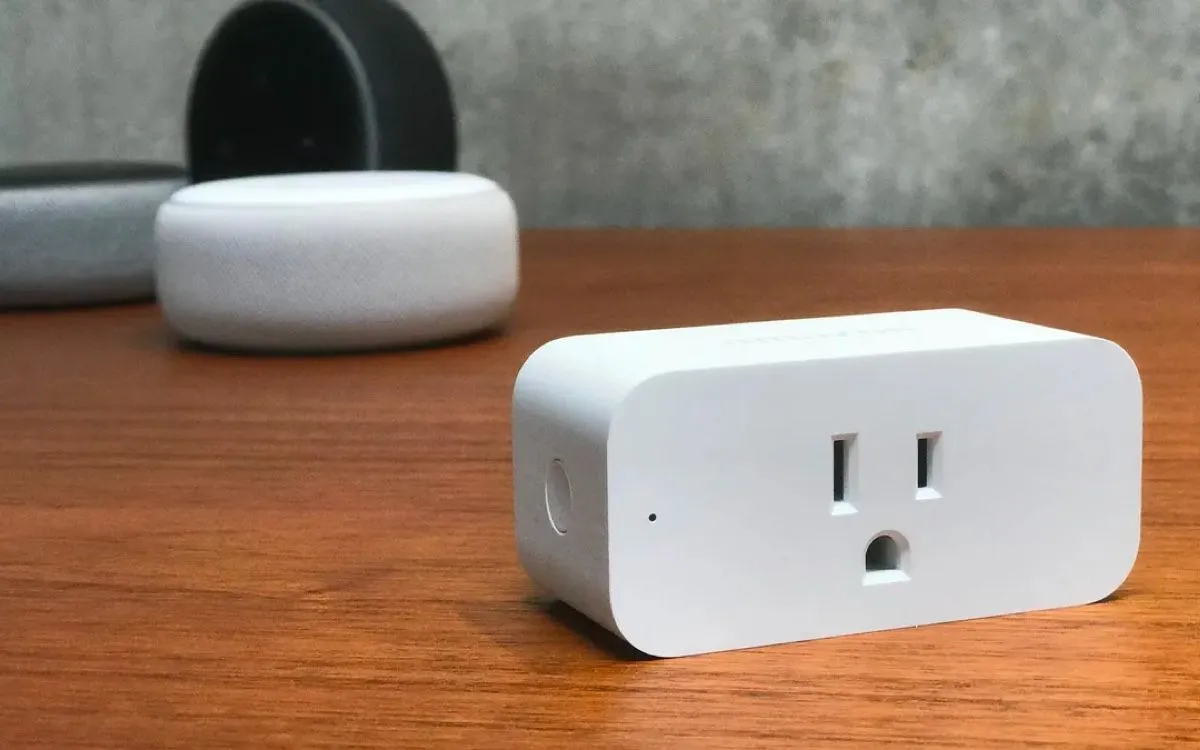
Amazon SMART Plug

Published on by Lars Normark Andersen

Amazon Smart Plug for Digital Signage

Workday is over? Then why keep the displays running? Enter Amazon SMART Plug: an intelligent way of telling your devices when to go to sleep and take a rest.

Smart home technology is getting more and more common in residential buildings and, in some regions, in stores, malls, dealerships, etc. Unsurprisingly, this trend has touched the Digital Signage industry too. We recently tested the Amazon SMART Plug as a way to schedule power outlet downtime and save you money on your digital signage installation as a result.

So what is a Smart Plug?

The short version is that it’s a $25 plug that can be controlled by a remote or by schedules stored on the smart plug itself, turning the power on and off. That means you can connect both your TV and your player to the smart plug, create schedules, and have it control when your devices consume power.

Note, if you have a Samsung TV running Tizen (More on Tizen supported TVs) you do not need a smart plug as our app can automatically turn the TV on and off.

How does it work?

All you have to do is connect the Amazon Smart Plug between your wall plug and your TV, player, or power distribution. Next, you should download the Alexa app on your smartphone (works with iOS, Android, and Fire OS). Follow the on-screen instructions and get linked to your SMART Plug in a few moments. When your Amazon SMART Plug is linked to your phone, you can create schedules telling the device to turn on the power when needed and turn off the power when there is no need for running your digital signage.

Remember to check your TV settings before deploying them. It’s important that your TV starts automatically when powered on and that it’s on the correct HDMI channel.

The average power consumption for an LED TV is around 95 watts, the plasma around 138 watts, and the LCD around 140 watts. Let’s say an LED TV is running 24 hours, that’s an average of 2.4 kWh per day and around $96 on a yearly basis (you may be paying way more depending on TV size, technology, and your kWh price). SMART Plug can help you cut down on that consumption, resulting in significant savings.

Also, if you are more comfortable with a mechanical timer plug, you should be able to get one from Amazon.

How we write and check our articles:Editorial Policy
More from the blog

  • How to make sure your digital signage is always running smoothly
    Technical

    How to Keep Your Digital Signage Running Smoothly

    Digital signage is designed to run continuously—24 hours a day, 7 days a week, 365 days a year. The software at the heart of Play Digital Signage is engineered to make this a reality, incorporating fault-tolerant features like content caching and crash recovery.

  • Building the Tizen app for Digital Signage
    Technical

    How we build the Tizen app for Samsung

    In this article we’ll be looking at the pros and cons of SSSP application from both user and developer perspective. We’ll be also setting up tooling to incorporate the development into a command line-based flow by using commands that are not really well documented.

  • Twitter plugin discontinued
    Technical

    Twitter plugin discontinued

    We are sad to announce that we’ve had to remove the Twitter plugin from Play Digital Signage plugins. This change is a result of Twitter changing their API pricing. We do not feel the new pricing model is reasonable looking forward.

  • Java Runtime Security in digital signage
    Technical

    Java runtime Security

    Java runtime security is just as important as any other security issue, but as a user of Play Digital Signage, you have nothing to worry about.

  • Video Wall for Menu Boards in Digital Signage
    Technical

    Menu Boards and Video Walls

    Before I begin digging into what, why, and how, let’s look at the two main headlines — Menu boards and video walls. Menu boards and Video walls are in many ways the same thing, it includes more than one screen and the main purpose for them both is creating an area of screens to make something more visible — Let’s face it, size matters.

  • The Best Digital Signage Hardware
    Technical

    What is the best digital signage device?

    What is the best digital signage hardware? It is a trick question— and a question impossible to give a short answer to unless cost is not a factor. But let’s try to answer it anyway because it’ll save you headaches, money and increase your chances of success in the long run.

Need more information about digital signage?

See how others use digital signage in their business, or explore solutions by industry. Questions? Reach out on the live chat any time.

Las Vegas, Nevada
Lars Normark Andersen

CEO

Lars Normark Andersen

74 published posts

Lars Normark Andersen is the CEO of Play Digital Signage. He co-founded the company with friends while facing the classic underdog challenges — a small office, limited resources, and many sleepless nights.

Read the full profile

Book a free demo

Loading free times…